Wednesday, July 12, 2023

Stateless Widget VS StateFull Widget

SLW VS SFW


StateLessWidget

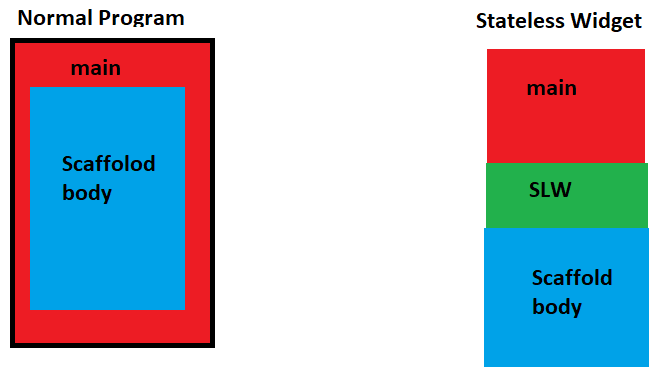
  • SLW widgets are static widgets and don't change (properties or data) during lifetime
  • SLW used to display on UI
  • use SLW subclass
  • Examples screen only show UI 
  • (Text, Icon, Image, Container)

StateFull Widget

SFW are dynamic widgets and change during the lifetime

STW have an internal state

STW is used for data change

use SFW subclass + setstate ()

Examples Screen with data (variable) change 

(TextField, Radion button, Checkbox button 

SFW Example(Checkbox)


SFW Example(TextField)


Coding Example (SLW)

// stateless widget
import 'package:flutter/material.dart';

void main(List<String> args) {
  runApp(MaterialApp(
    home: counter(), //calling SLW
  ));
}

//outside main()
class counter extends StatelessWidget {
  const counter({super.key});

  @override
  Widget build(BuildContext context) {
    return Scaffold(
      backgroundColor: Colors.amber,
      appBar: AppBar(
        backgroundColor: Colors.black,
        title: const Text(
          "Counter",
          style: TextStyle(fontSize: 20),
        ),
        centerTitle: true,
      ),
      body: Padding(
        padding: const EdgeInsets.all(20),
        child: Column(
          children: [
            Center(
              child: Text( // Statless widget
                "welcome to Flutter",
                style: TextStyle(fontSize: 20, fontWeight: FontWeight.bold),
              ),
            )
          ],
        ),
      ),
    );
  }
}

SateFull Widget 


// statefull widget
import 'package:flutter/material.dart';

void main(List<String> args) {
  runApp(MaterialApp(
    home: calculator(), //calling SFW
  ));
}

//outside main()

class calculator extends StatefulWidget { // SFW class
  const calculator({super.key});

  @override
  State<calculator> createState() => _calculatorState();
}

class _calculatorState extends State<calculator> {
  @override
  Widget build(BuildContext context) {
    return Scaffold(
      body: Column(
        children: [
          Center(
            child: Text(
              "we are using StateFull Widget",
              style: TextStyle(fontSize: 20, fontWeight: FontWeight.bold),
            ),
          )
        ],
      ),
    );
  }
}


Tuesday, July 11, 2023

FloatingAction Buttion in Flutter

 FluttingAction Buttion

 It is a rounded shape widget that floats on the screen.


Properites

  • child
  • tooltip
  • foregroundColor
  • backgroundColor
  • hoverColor
  • splashColor
  • elevation

Coding Example

import 'package:flutter/material.dart';

void main(List<String> args) {
  runApp(MaterialApp(
    home: Scaffold(
      backgroundColor: Colors.white,
      body: Center(
        child: FloatingActionButton(
            child: Text(
              "Ok",
              style: TextStyle(fontSize: 19),
            ),
            tooltip: "Add buttion",
            elevation: 50,
            backgroundColor: Colors.red,
            foregroundColor: Colors.black,
            hoverColor: Colors.amber,
            splashColor: Colors.white,
            onPressed: () {}),
      ),
    ),
  ));
}


Monday, July 10, 2023

Profile App in Flutter

 Profile APP

Profile App provides basic personal information about a person.


Coding Example (Flutter)


import 'package:flutter/material.dart';

void main(List<String> args) {
  runApp(MaterialApp(
    debugShowCheckedModeBanner: false,
    home: Scaffold(
        backgroundColor: const Color.fromARGB(255, 164, 69, 69),
        body: Padding(
          padding: const EdgeInsets.all(100.0),
          child: Center(
            child: Column(
              children: [
                Image.network(
                  "https://encrypted-tbn0.gstatic.com/images?q=tbn:ANd9GcQDKFmIAeGGdc5Sudv7nTDy6S1_fhcJ8lvlHw&usqp=CAU",
                  height: 100,
                  width: 100,
                ),
                const SizedBox(
                  height: 20,
                ),
                const Text(
                  "Muhammad Arsalan",
                  style:
                      TextStyle(fontWeight: FontWeight.bold, color: Colors.red),
                ),
                const Text(
                  "Professor of Mathematics",
                  style: TextStyle(fontSize: 10, color: Colors.grey),
                ),
                const SizedBox(
                  height: 10,
                ),
                const Divider(
                  color: Colors.red,
                  thickness: 3,
                ),
                const SizedBox(
                  height: 10,
                ),
                Container(
                    padding: const EdgeInsets.only(left: 10),
                    decoration: BoxDecoration(
                      borderRadius: BorderRadius.circular(10),
                      border: Border.all(
                          // color: Colors.white,
                          ),
                    ),
                    child: const Row(
                      children: [
                        Icon(
                          Icons.mail,
                          color: Colors.red,
                        ),
                        SizedBox(
                          width: 5,
                        ),
                        Text("arsalan22@gmail.com",
                            style: TextStyle(
                              color: Colors.grey,
                              fontWeight: FontWeight.bold,
                            )),
                      ],
                    )),
                const SizedBox(
                  height: 20,
                ),
                Container(
                    padding: const EdgeInsets.only(left: 10),
                    decoration: BoxDecoration(
                      borderRadius: BorderRadius.circular(10),
                      border: Border.all(
                          // color: Colors.white,
                          ),
                    ),
                    child: const Row(
                      children: [
                        Icon(
                          Icons.call,
                          color: Colors.red,
                        ),
                        SizedBox(
                          width: 5,
                        ),
                        Text("0311-7687654",
                            style: TextStyle(
                              color: Colors.grey,
                              fontWeight: FontWeight.bold,
                            )),
                      ],
                    )),
                const SizedBox(
                  height: 20,
                ),
                Container(
                    padding: const EdgeInsets.only(left: 10),
                    decoration: BoxDecoration(
                      borderRadius: BorderRadius.circular(10),
                      border: Border.all(
                          // color: Colors.white,
                          ),
                    ),
                    child: const Row(
                      children: [
                        Icon(
                          Icons.home,
                          color: Colors.red,
                        ),
                        SizedBox(
                          width: 5,
                        ),
                        Text("Swabi",
                            style: TextStyle(
                              color: Colors.grey,
                              fontWeight: FontWeight.bold,
                            )),
                      ],
                    )),
                const SizedBox(
                  height: 20,
                ),
                Container(
                    padding: const EdgeInsets.only(left: 10),
                    decoration: BoxDecoration(
                      borderRadius: BorderRadius.circular(10),
                      border: Border.all(
                          // color: Colors.white,
                          ),
                    ),
                    child: const Row(
                      children: [
                        Icon(
                          Icons.logout,
                          color: Colors.red,
                        ),
                        SizedBox(
                          width: 5,
                        ),
                        Text("Logout",
                            style: TextStyle(
                              color: Colors.grey,
                              fontWeight: FontWeight.bold,
                            )),
                      ],
                    )),
                const SizedBox(
                  height: 40,
                ),
                Row(
                  children: [
                    Container(
                        height: 30,
                        width: 200,
                        decoration: BoxDecoration(
                          color: Colors.amber,
                          borderRadius: BorderRadius.circular(15),
                        ),
                        child: const Padding(
                          padding: EdgeInsets.only(left: 30),
                          child: Row(
                            children: [
                              Center(child: Icon(Icons.edit)),
                              SizedBox(
                                width: 10,
                              ),
                              Center(
                                child: Text(
                                  "Edit Profile",
                                  style: TextStyle(fontWeight: FontWeight.bold),
                                ),
                              )
                            ],
                          ),
                        ))
                  ],
                )
              ],
            ),
          ),
        )),
  ));
}


Wednesday, July 5, 2023

Column-MainAxisAlignment

 MainAxis VS CrossAxis


MainAxisAlignment Properties

  1. MainAxisAlignment.start: All widgets start from the top 
  1. MainAxisAlignment.end: All widgets start from the end
  1. MainAxisAlignment. centre:All widgets start from the centre
  1. MainAxisAlignment.spaceBetween: First & Last widget no space & space between inner widget
  1. MainAxisAlignment.spaceAround: first and last widget with half of the space of inner widgets
  1. MainAxisAlignment.spaceEvenly: All widgets wrapped with equal space

Coding Example

import 'package:flutter/material.dart';

void main(List<String> args) {
  runApp(MaterialApp(
    home: Scaffold(
      body: Center(
        child: Column(
          mainAxisAlignment: MainAxisAlignment.start,
          children: [
            Container(
              color: Colors.red,
              width: 100,
              height: 100,
              child: const Center(child: Text("First Child")),
            ),
            Container(
              color: Colors.green,
              width: 100,
              height: 100,
              child: const Center(child: Text("Second Child")),
            ),
            Container(
              color: Colors.blue,
              width: 100,
              height: 100,
              child: const Center(child: Text("Third Child")),
            ),
          ],
        ),
      ),
    ),
  ));
}


Tuesday, July 4, 2023

Row & Column Widget

 Row Widget

The row is a multi-child widget which arranges its children horizontally.


Coding Example


import 'package:flutter/material.dart';

void main(List<String> args) {
  runApp(MaterialApp(
    debugShowCheckedModeBanner: false,
    home: Scaffold(
      body: Center(
        child: Row(
          mainAxisAlignment: MainAxisAlignment.spaceAround,
          children: [
            Container(
              color: const Color.fromARGB(255, 142, 109, 8),
              height: 100,
              width: 100,
              child: const Center(
                  child: Text(
                "first child",
                style: TextStyle(
                    fontSize: 10,
                    fontWeight: FontWeight.bold,
                    color: Colors.white),
              )),
            ),
            Container(
              color: const Color.fromARGB(255, 11, 21, 168),
              height: 100,
              width: 100,
              child: const Center(
                  child: Text(
                "Second child",
                style: TextStyle(
                    fontSize: 10,
                    fontWeight: FontWeight.bold,
                    color: Colors.white),
              )),
            ),
            Container(
              color: const Color.fromARGB(255, 164, 15, 62),
              height: 100,
              width: 100,
              child: const Center(
                  child: Text(
                "Third child",
                style: TextStyle(
                    fontSize: 10,
                    fontWeight: FontWeight.bold,
                    color: Colors.white),
              )),
            ),
          ],
        ),
      ),
    ),
  ));
}


Column Widget

Column widget is a multi-child widget which arranges its children vertically.

Coding Example


import 'package:flutter/material.dart';

void main(List<String> args) {
  runApp(MaterialApp(
    debugShowCheckedModeBanner: false,
    home: Scaffold(
      body: Center(
        child: Column(
          mainAxisAlignment: MainAxisAlignment.spaceAround,
          children: [
            Container(
              color: const Color.fromARGB(255, 142, 109, 8),
              height: 100,
              width: 100,
              child: const Center(
                  child: Text(
                "first child",
                style: TextStyle(
                    fontSize: 10,
                    fontWeight: FontWeight.bold,
                    color: Colors.white),
              )),
            ),
            Container(
              color: const Color.fromARGB(255, 11, 21, 168),
              height: 100,
              width: 100,
              child: const Center(
                  child: Text(
                "Second child",
                style: TextStyle(
                    fontSize: 10,
                    fontWeight: FontWeight.bold,
                    color: Colors.white),
              )),
            ),
            Container(
              color: const Color.fromARGB(255, 164, 15, 62),
              height: 100,
              width: 100,
              child: const Center(
                  child: Text(
                "Third child",
                style: TextStyle(
                    fontSize: 10,
                    fontWeight: FontWeight.bold,
                    color: Colors.white),
              )),
            ),
          ],
        ),
      ),
    ),
  ));
}


Sunday, July 2, 2023

Container-Decoration

 Decoration Property is used to set Container.

  1. Border
  2. Border Radius
  3. Border Shadow


Example

import 'package:flutter/material.dart';

void main(List<String> args) {
  runApp(MaterialApp(
    debugShowCheckedModeBanner: false,
    home: Scaffold(
      // backgroundColor: Colors.amber,
      appBar: AppBar(
        backgroundColor: Colors.black,
        title: const Text("Container"),
        centerTitle: true,
      ),
      body: Center(
        child: Container(
          // margin: EdgeInsets.all(20),
          // padding: EdgeInsets.all(30),
          // color: Colors.red,
          height: 200,
          width: 250,
          decoration: BoxDecoration(
              color: Colors.amber,
              border: Border.all(
                  color: const Color.fromARGB(255, 212, 6, 6),
                  width: 5,
                  style: BorderStyle.solid),
              borderRadius: const BorderRadius.only(
                  topLeft: Radius.circular(40),
                  bottomRight: Radius.circular(40)),
              boxShadow: const [
                BoxShadow(color: Colors.black, offset: Offset(6, 6))
              ]),

          child: const Center(
            child: Text(
              "welcome",
              style: TextStyle(fontSize: 20, fontWeight: FontWeight.bold),
            ),
          ),
        ),
      ),
    ),
  ));
}

Monday, June 26, 2023

Container Widget

 The container is a rectangular box with only a single child.


Properties

  • width
  • height 
  • color 
  • padding 
  •  margin  
  • alignment
  • child
  •  decoration

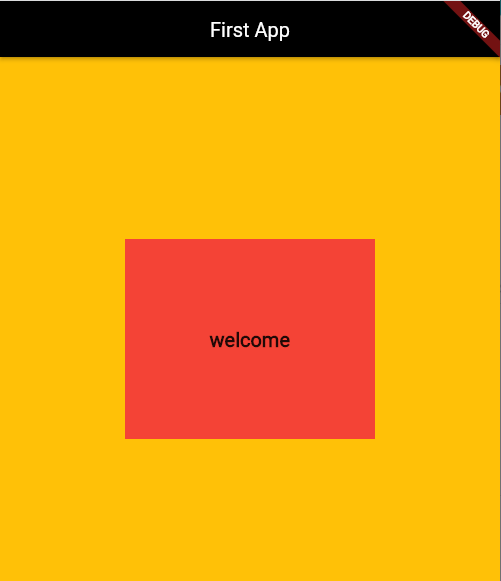
Example (code + Output)


import 'package:flutter/material.dart';

void main(List<String> args) {
  runApp(MaterialApp(
    home: Scaffold(
      backgroundColor: Colors.amber,
      appBar: AppBar(
        backgroundColor: Colors.black,
        title: const Text("First App"),
        centerTitle: true,
      ),
      body: Center(
        child: Container(
          // margin: EdgeInsets.all(20),
          // padding: EdgeInsets.all(30),
          color: Colors.red,
          height: 200,
          width: 250,
          child: const Center(
            child: Text(
              "welcome",
              style: TextStyle(fontSize: 20, fontWeight: FontWeight.bold),
            ),
          ),
        ),
      ),
    ),
  ));
}

Linked List Implementation using C++ Structure

3 Nodes Linked List Implementaion Single Linked list #include<iostream> using namespace std;   struct Node{ int data; Node* next; Node...