Monday, June 26, 2023

Container Widget

 The container is a rectangular box with only a single child.


Properties

  • width
  • height 
  • color 
  • padding 
  •  margin  
  • alignment
  • child
  •  decoration

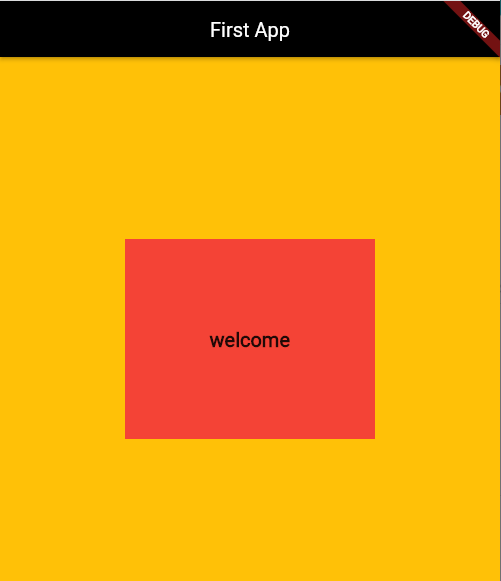
Example (code + Output)


import 'package:flutter/material.dart';

void main(List<String> args) {
  runApp(MaterialApp(
    home: Scaffold(
      backgroundColor: Colors.amber,
      appBar: AppBar(
        backgroundColor: Colors.black,
        title: const Text("First App"),
        centerTitle: true,
      ),
      body: Center(
        child: Container(
          // margin: EdgeInsets.all(20),
          // padding: EdgeInsets.all(30),
          color: Colors.red,
          height: 200,
          width: 250,
          child: const Center(
            child: Text(
              "welcome",
              style: TextStyle(fontSize: 20, fontWeight: FontWeight.bold),
            ),
          ),
        ),
      ),
    ),
  ));
}

Text Widget

Text Widget

Text is the basic widget in Flutter used to display string.


Text Properties

  • fontSize
  • color 
  • fontWeight
  •  fontStyle 
  • fontfamily
  •  letterSpacing 
  •  wordSpacing 
  • backgroundColor

Example
import 'package:flutter/material.dart';

void main(List<String> args) {
  runApp(MaterialApp(
    home: Scaffold(
      backgroundColor: Colors.green,
      appBar: AppBar(
        backgroundColor: Colors.black,
        title: const Text("Weather App"),
        centerTitle: true,
      ),
      body: const Center(
          child: Text(
        "Welcome to Flutter",
        style: TextStyle(
          fontSize: 40,
          fontWeight: FontWeight.bold,
          color: Color.fromARGB(255, 59, 8, 4),
          backgroundColor: Colors.amber,
          fontStyle: FontStyle.italic,
          decoration: TextDecoration.underline,
          // letterSpacing: 15,
          wordSpacing: 15,
        ),
      )),
    ),
  ));
}

Wednesday, June 21, 2023

Scaffold Widget

 Scaffold Widget


  1. The Scaffold widget occupies the whole screen of the device 

  1. Provides the visual structure for the UI of the Flutter app

Properties

  • appBar
  •  body
  •  floatingActionButton
  • drawer
  • backgroundColor
  • bottomNavigationBar

Example (VS code)

import 'package:flutter/material.dart';

void main(List<String> args) {
  runApp(MaterialApp(
      home: Scaffold(
          backgroundColor: Colors.amber,
          appBar: AppBar(
            backgroundColor: Colors.red,
            centerTitle: true,
            title: Text("Profile App"),
          ),
          body: Center(
            child: Text(
              "Welcome to Flutter",
              style: TextStyle(fontSize: 30),
            ),
          ))));
}


Tuesday, June 20, 2023

App bar

 import 'package:flutter/material.dart'; //dart language


void main(List<String> args) {
  runApp(MaterialApp(
    home: Scaffold(
      appBar: AppBar(
        title: Text("First App"),
        backgroundColor: Color.fromARGB(255, 31, 3, 82),
        centerTitle: true,
      ),
    ),
  ));
}

Monday, June 19, 2023

First Flutter App

import 'package:flutter/material.dart';

void main(List<String> args) {
  runApp(MaterialApp(
    home: Scaffold(
      appBar: AppBar(
        title: const Text("first app"),
      ),
      body: const Text("welcome to Flutter"),
    ),
  ));
}

Saturday, June 17, 2023

How to Install Flutter ?

Flutter Installation (steps)

  1. Install Flutter SDK (https://docs.flutter.dev/get-started/install)
  2. create an src folder in the C drive
  3. Download Flutter SDK and Past to the src folder
  4. Update path variable (C:\src\flutter\bin)
  5. Run Flutter Doctor (C:\src>flutter doctor)
  6. Install VS code 
  7. Install Flutter Plugin

Friday, June 16, 2023

Mobile development Frameworks and Languages

 There are two main types of mobile app develeomet based on mobile operating system

  1. Native App development (only for Android or ios)
  2. Cross-Platform App development (for both android or ios)


Wednesday, June 14, 2023

Flutter : Main Axis VS Cross Axis

 import 'package: flutter/material.dart';


void main(List<String> args) {
  runApp(MaterialApp(
    home: Scaffold(
      body: Center(
        child: Column(
          mainAxisAlignment: MainAxisAlignment.start,
          crossAxisAlignment: CrossAxisAlignment.stretch,
          children: [
            Container(
                color: const Color.fromARGB(255, 228, 12, 153),
                height: 100,
                width: 200,
                child: const Center(
                  child: Text(
                    "child 1",
                    style: TextStyle(fontWeight: FontWeight.bold),
                  ),
                )),
            Container(
                color: const Color.fromARGB(255, 5, 133, 16),
                height: 100,
                width: 250,
                child: const Center(
                  child: Text(
                    "child 1",
                    style: TextStyle(fontWeight: FontWeight.bold),
                  ),
                )),
            Container(
                color: const Color.fromARGB(255, 228, 12, 12),
                height: 100,
                width: 300,
                child: const Center(
                  child: Text(
                    "child 1",
                    style: TextStyle(fontWeight: FontWeight.bold),
                  ),
                ))
          ],
        ),
      ),
    ),
  ));
}

Linked List Implementation using C++ Structure

3 Nodes Linked List Implementaion Single Linked list #include<iostream> using namespace std;   struct Node{ int data; Node* next; Node...